PREVIOUS ARTICLENEXT ARTICLE
NEWS
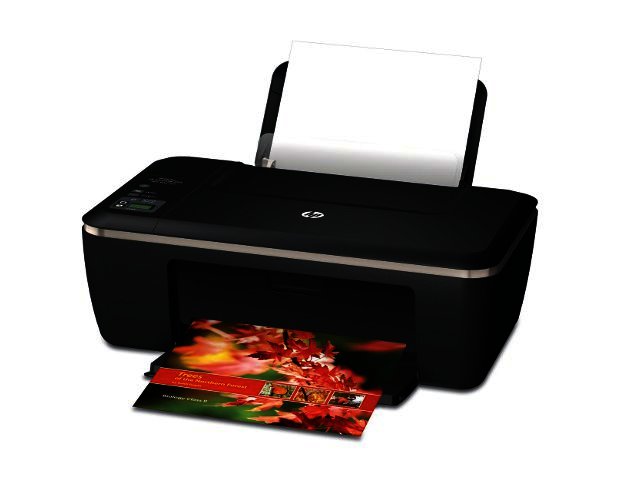
New range of all-in-ones from HP provides Ink Advantage
By Staff Writer 10 August 2012 | Categories: news
Related Articles
 Solar panel industry is the tail wagging the dog: ...
 Tech integration in education, essential not optio...
.jpeg) How can local companies best adapt to global field...
How can local companies best adapt to global field...Black gold: no, it is not oil, rather it’s printer ink. As the price of this valuable commodity has risen over the past few years, when it came to purchasing new cartridges, many consumers have rather resorted to making use of ink-replacement kits, or simply bought a cheap new printer.
HP is addressing this behaviour with six new printers in its Ink Advantage range. According to the company, compared to other HP Deskjet ink cartridges, this new Ink Advantage printing systems enable users to print up to twice the amount of pages for the same cost. The original HP Ink cartridges that are used with the Deskjet Ink Advantage printers can print up to 600 pages and are available from R110 to R130.
This new line-up of Deskjet Ink Advantage printers are enhanced with more features and faster print speeds than predecessors, while offering different price-points to address customers’ varying needs.
The new Deskjet Ink Advantage printers include the following:
? The HP Deskjet Ink Advantage 2515 All-in-One printer is best suited for home-users who want a compact and affordable device. Users can easily print, scan and copy documents and photos from the icon display and customise images or text with the reduce/enlarge buttons. Students can also take advantage of affordable, borderless prints in HP-quality to create assignments and projects. It retails in the range of R700.
? HP’s Deskjet Ink Advantage 3515 All-in-One offers a compact and sleek design, along with an icon-based display. This 50 mm (1.9”) adjustable mono display makes navigating through the printer options a breeze, while it includes duplex printing. The HP Deskjet Ink Advantage 3515 All-in-One printer will be available from R900.
? The HP Deskjet Ink Advantage 3525 e-All-in-One retails for R1 000 and features the ability to automatically print on both sides of a paper (duplex printing). Wireless direct printing is also onboard, a new feature that allow users to easily print from wireless-enabled mobile devices without a network or router. The 3525 is most suited for home users and, like the rest of the range, is Energy Star certified.
? HP’s Deskjet Ink Advantage 5525 e-All-in-One printers includes a 67 mm (2.6”) touchscreen and features wireless direct printing and downloadable apps to print a range of documents, including calendars and to-do lists. The 5525 further offers automatic duplexing, direct scanning to emails without a PC and HP’s ePrint technology, which allows users to email documents to the 5525 to print automatically. It retails for R1 500.
? The HP Deskjet Ink Advantage 4615 All-in-One will appeal to small business users looking for a versatile product with print, scan, copy, and fax functions, while producing documents at a low cost. The ENERGY STAR qualified devices feature a 35-page document feeder to help complete copy jobs quickly. It retails in the region of R1 400.
? With the HP Deskjet Ink Advantage 4625 e-All-in-One printer, home and small offices can easily print while away from the device with HP ePrint, and share resources with wireless networking. We’ve had this all-in-one printer in the office, and after printing numerous proofs, ink levels are still at very acceptable levels. The HP Deskjet 4625 e-All-in-One printer is available from R1 500.
“HP has an unrivalled track record of bringing industry-leading innovation and choice to our customers. Our growing HP Deskjet Ink Advantage portfolio will offer more affordable choices that allow our customers to print more at a lower cost, without sacrificing quality or reliability,” said Thibault Dousson, HP South Africa Printing and Personal Systems general manager.
In related news, HP recently revealed its second generation line-up of ultrabooks.
USER COMMENTS
Most Read Articles
 igus is growing worldwide
 South African retailers have arrived at an e-commerce crossroads
 Solar panel industry is the tail wagging the dog: A fundamental flaw in SA’s r...
 Tech integration in education, essential not optional
 -2.jpg) CSSi’s green practices secure off-grid data centre gold at the Data Centre Wor...
CSSi’s green practices secure off-grid data centre gold at the Data Centre Wor... Fintechs should develop products that address the exact needs of their customers
Read

Magazine Online

TechSmart.co.za is South Africa's leading magazine for tech product reviews, tech news, videos, tech specs and gadgets.
Start reading now >
Download latest issue

Have Your Say
What new tech or developments are you most anticipating this year?
New smartphone announcements (44 votes)
Technological breakthroughs (28 votes)
Launch of new consoles, or notebooks (14 votes)
Innovative Artificial Intelligence solutions (28 votes)
Biotechnology or medical advancements (21 votes)
Better business applications (132 votes)

