
 SanDisk Max Endurance MicroSDXC memory card 128 GB

 WD My Passport 6 TB hard disk drive
 Western Digital My Passport Go 512 GB SSD
A by-product of our constantly evolving tech world, is the large amount of storage devices that photographers, videographers as well as general PC users have to deal with. These range from memory stick duo cards, as used by mostly Sony products such as the PlayStation Portable handheld, SD cards on cameras, and the microSD memory card of your smartphone.
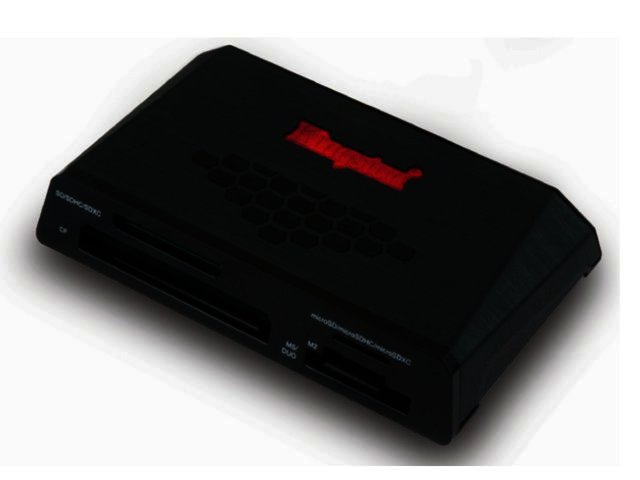
The amount of data stored on these devices are also becoming increasingly more (those HD videos or RAW files on the SDHC card of your DSLR camera for example), so apart from being able to easily access data from these cards, fast data transfer is just as important in order to save time. This is exactly what Kingston’s Media Reader USB 3.0 Flash Media Reader offers.
Design
Kingston’s USB 3.0 Media Reader boasts compact measurements (93.17 x 52.68 x 16 mm) and robust construction, meaning that road-warriors can take it with them as its convenient size makes it ultra-portable.
It will provide you with quick access to a multitude of storage types including SD, SDHC and the new high-capacity Secure Digital eXtended Capacity (SDXC) memory cards, as well as CF (type I & II), memory stick micro (M2), memory stick duo and microSD/ microSDHC cards.
Superspeed
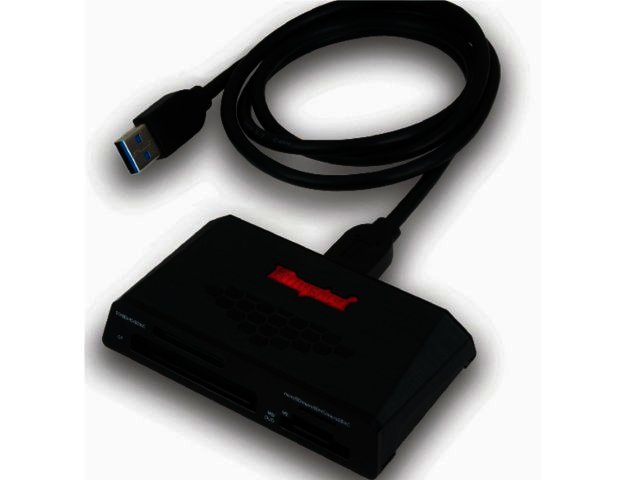
As a USB 3.0 classified reader, it offers the same ease-of-use and plug and play capabilities of USB 2.0 card readers and is still backwards compatible with USB 2.0 slots. When connected with a Superspeed (USB 3.0) slot though, the performance increases by up to ten times more than USB 2.0, to a transfer rate of up to 5 Gb/s .
This resulted in significantly faster data transfers, for example copying a 225 MB of music from a microSD card took around 35.3 seconds on a USB 2.0 connection. When the Media Reader was plugged into a USB 3.0 slot, this same amount of data took just 11.9 seconds. Transferring 2.10 GB worth of high-resolution photos from a SDHC card took 131 seconds on a USB 2.0 port, but only 99 seconds while connected to a USB 3.0 slot. A movie file (1.38 GB) from SDHC card took around 64 seconds on USB 3.0, and over 90 seconds on USB 2.0.
Final word
Kingston Technology’s USB 3.0 Media Reader is compact and enables users to transfer data from or amongst a multitude of different storage types. If you are lucky enough to have a USB 3.0 slot, then you can transfer your info at a quicker rate as well. It is backed by a two-year warranty, as well as tech support and goes for a recommended retail price of R222. Visit Kingston online for more info.
Reader Specifications:
- Dimensions: 93.17 x 52.68 x 16 mm
- Speed Rating: USB 3.0 - up to 5 Gb/s data transfer speed, USB 2.0 - 480 Mbits/s
- Operating Temperature: 0º to 60º C
- Storage Temperature: -20º to 85ºC
- Operating system compatibility: Windows 7, Windows Vista (SP1, SP2), Windows XP (SP3)
- Guaranteed two-year warranty


 Motorola G37 smartphone
 The migration catalyst - turning virtualisation disruption into application inno...
 Smart cities must be human cities - Why data needs a heartbeat
 Why multi-tenancy is central to Mobile Virtual Network Operators partnerships an...
 Logitech Pebble 2 Combo
 Samsung Galaxy S4 Zoom - white
 Quick Review: Tecno Spark10 5G
.jpeg) Beware of deepfakes in the AI age, warns Kaspersky
Beware of deepfakes in the AI age, warns Kaspersky


