
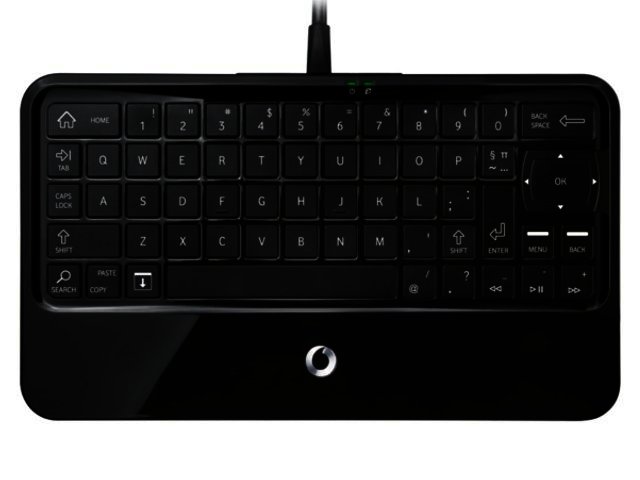
Vodacom is aiming to give a lot more South Africans a way to access the internet via its newly launched WebBox. This is because the device allows users to connect to the internet by way of their TV sets, without having to worry about a PC.
Web what?
Vodacom’s WebBox is a plug-n-play keyboard that connects to your TV via the supplied RCA cables and is powered via a two point charger that plugs into your wall socket. It also boasts a built-in EDGE/GPRS modem, with which to access the web, as well as a memory card slot allowing users to store and have access to a lot of their multimedia content on the bundled 2 GB microSD card.
You also get a SIM card, that you have to activate from your mobile phone first (by dialling 100). Thereafter you insert it in the device’s SIM slot and when you want to recharge this SIM card with airtime you can purchase it directly from your WebBox or send airtime to the number that you’ll be allocated when activating the SIM.
You can convert the airtime into data bundles which you utilise to access the internet and download your email.
Google powered
You access the device’s functionality via the user-friendly Android 2.1 operating system (Éclair), with web browsing duties being handled by way of the Vodafone Opera Mini Browser. The menu structure of the OS is very straightforward and consequently easy to understand and use.
Browsing the web from your couch
As easy as the mobile OS is to navigate, so simple is it to browse the web via this device. Considering that it’s an entry-level device, the WebBox does a reasonably good job at rendering webpages and checking your email (which also boasts trouble-free setup for many popular email services such as Hotmail, webmail and Gmail). The browsing speed is also adequate for most pages, but would have been a lot faster on a 3G network.
What Opera Mini does bring to the table is its crucial ability to compress data that for the end-user translates into faster web surfing and more importantly lower data costs. The last point is also very important as users have to top of their airtime and convert these to data bundles in order to keep browsing.
Typing on the keyboard to input text and utilising the five way directional keypad for browsing pages are comfortable in short stints, but can get tiring during longer sessions. This is because the keyboard is smaller than the average PC one, so your hands are closer together when typing, making them more succeptible to cramps.
Like Apple devices it lacks support for Adobe’s Flash or even other plug-ins such as Microsoft’s Silverlight, meaning these will not work properly (or at all) in the browser, which is a bit of a bummer.
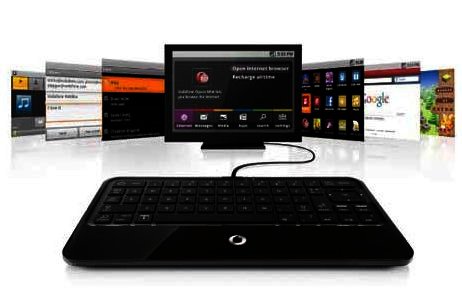
More than just the net
By employing the Vodafone WebBox users aren’t just able to access the internet. A number of additional features are available to them courtesy of the Android mobile OS.
There is a video player, enabling you to play your movies and TV series, whilst the integrated FM radio allows you to tune into your favourite station. A picture viewer gives you the ability to showcase photos of your friends and family via your TV. All the applications are easy to use even if one isn’t familiar with Google’s Android platform.
There are also a number of additional apps such as a notebook, calculator and calendar app, which can come in handy of you don’t have a calculator near by and need to do some quick number crunching. Users are also able to download apps using the device in order to add to the functionality that it can perform. Do note that Android Market is not open for business, meaning users won’t have access to the thousands of apps residing there, even though the Android OS is present.
You can also employ this device to send SMS messages, unfortunately data bundles cannot be used for this purpose so you need to have some regular airtime for this purpose.
Final word
Vodafone’s WebBox fulfils a great need to bring the internet to more users in South Africa. It is by no means a perfect device due to its limitations, the likes of lack of flash support and 3G, but it remains an easy way of accessing the web for those users that have a TV but not a computer.
It is available at all participating Vodashops and selected Vodacom outlets and is available at a recommended retail price of R749 (including VAT), which we feel is a bit expensive for the target market that it's aimed at. You go get a once-off 100 MB data bundle included with the device, allowing you to start browsing from the get go. For more information on this product call 082-19326 (0821YEBO).
Pro
Easy-to-use interface and simple setup, instant access to the web for PC-less users.
Con
Data bundles like with those for 3G dongles aren’t the most affordable, EDGE browsing not the fastest, browser lacks flash support, device a tad expensive.

PROS
Easy-to-use interface and simple setup, instant access to the web for PC-less users.

CONS
Data bundles like with those for 3G dongles aren't the most affordable, EDGE browsing not the fastest, browser lacks flash support, device a tad expensive.
 Norton 360 V 5.0
 Microsoft details first update for its HoloLens headset
 Final Fantasy XV reportedly launching before 2017
 Huawei now offers Power-M digital power solution in SA
 Logitech Pebble 2 Combo
 Samsung Galaxy S4 Zoom - white
 Quick Review: Tecno Spark10 5G
 Samsung Galaxy S4 Zoom (black)


