PREVIOUS ARTICLENEXT ARTICLE
NEWS
Android Apps of the month June 2012
By Ryan Noik 28 June 2012 | Categories: news
Related Articles
 Transforming your customer portal from a cost cent...
 Secure multicloud environments enable compliance, ...
 South Africa’s eCommerce market is growing fast ...
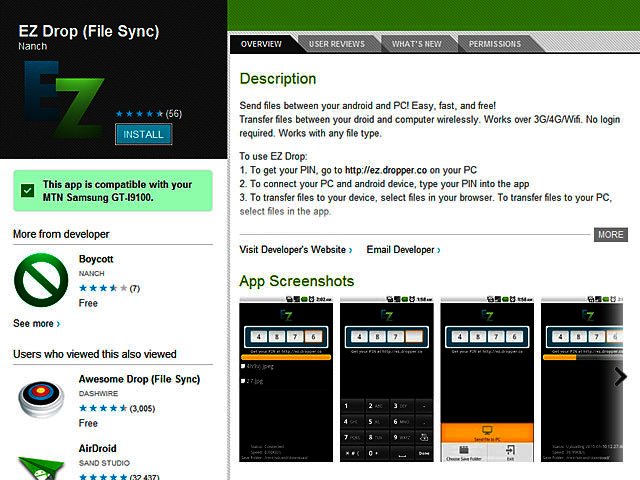
EZ Dropper: Mobile to PC
One of our biggest headaches is to always have the microUSB cable present to transfer data to and from an Android device to PC.
There is a way around this using EZ Drop, the only catch is both your phone and your PC needs to be connected to the net or a wi-fi network.
After installing the EZ Drop app on your phone, you need to connect to the EZ Dropper website with your PC and enter the given code on your phone. A bridge is then created between your PC and phone, where you can drag and drop files to transfer. Keep in mind that large file transfer is not quick.
Magic portals
For those who remember Valve’s Portal and Portal 2 fondly, the basic premise behind Magic Portals will be instantly familiar. Granted, Magic Portals doesn’t rise to the heights of those game titans, however, as a mobile game, it is quite good nonetheless.
The adventure puzzle game has you, as a magician, navigating his way through various fantasy inspired levels, by creating portals from one section to another. The goal though, which entails more of a challenge, is to use as few portals as possible, while collecting all the gems one can. The free app looks and sounds fantastic, with a full version retailing for R8.

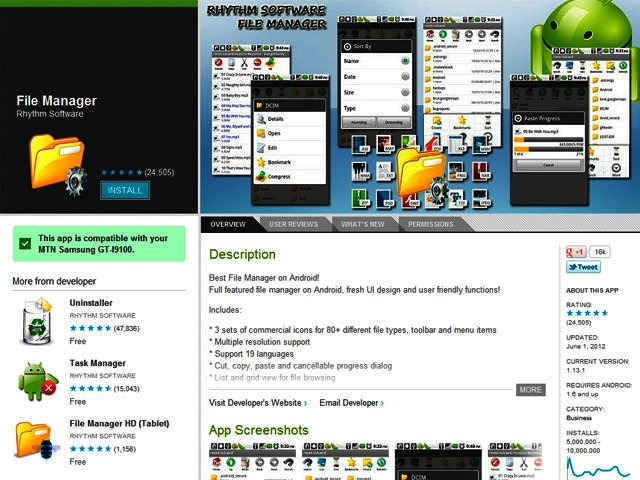
File Manager: View it all
Sometimes it is the simplest apps that nonetheless prove to be the most valuable. File Manager (by Rhythm Software) is one such app. Freely available and very straightforward to use, the app enables one to get a comprehensive view of everything on one’s device, displayed by size, date installed and number of files in a folder.
Within the file manager, one can create a new folder on one’s device, as well as view all files in folder in either list or grid view. Additionally, clicking on any file from within File Manager opens the appropriate programme to view, or in the case of movies, watch, it.
Android Tips of the month
Tip1: Did you know you can turn your Android phone into a Wi-Fi hotspot for your PC or others to connect to the net? Under Settings go to Wireless and Networks and look for Portable Hotspot. Turn it on, find the phone on your PC’s wireless networks, connect and type in the password provided on your phone. Just watch that data usage and turn off all automatic updates.
Tip 2: In Android Honeycomb, browse smarter by long pressing on any web link in a page, to open a dialogue box that will then offer you a choice of options. These include opening the link in a new tab, saving the link, copying the link URL or selecting the text. Should you choose to open a new tab, you can toggle between multiple tabs by pressing the menu key.
USER COMMENTS
Most Read Articles
 Logitech Pebble 2 Combo
 Samsung Galaxy S4 Zoom - white
 Samsung Galaxy S4 Zoom (black)
 Quick Review: Tecno Spark10 5G
Read

Magazine Online

TechSmart.co.za is South Africa's leading magazine for tech product reviews, tech news, videos, tech specs and gadgets.
Start reading now >
Download latest issue

Have Your Say
What new tech or developments are you most anticipating this year?
New smartphone announcements (46 votes)
Technological breakthroughs (29 votes)
Launch of new consoles, or notebooks (14 votes)
Innovative Artificial Intelligence solutions (29 votes)
Biotechnology or medical advancements (24 votes)
Better business applications (160 votes)

