
 Microsoft Sculpt ergonomic desktop

 DFI LanParty UT X58-T3eH8
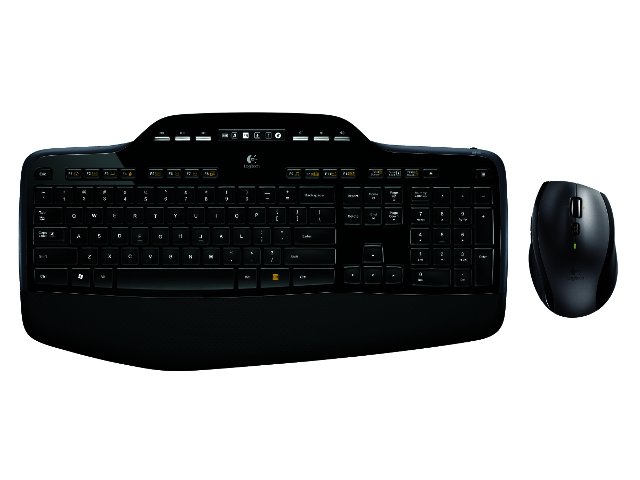
Logitech has always been known for high quality peripherals, and it’s no different with the Logitech Wireless Desktop MK710 combo.
The package includes the MK700 keyboard, the Marathon Mouse M705 and Logitech’s tiny unifying receiver that enables wireless functionality.
MK700 keyboard
The keyboard sports a good looking design which is both sturdy and comfortable. It features Logitech’s ‘Incurve Keys’, which means the keys have a central concavity to better accommodate your fingers. Softly rounded edges around the keys also increases comfort and gives the keys a soft, almost friendly feel. An LCD dashboard displaying information such as battery life and whether Caps Lock, Num Lock, Scroll Lock or the Mute key is enabled also makes an appearance.
A range of multimedia keys are available, situated to the left and right of the LCD panel, these include start, pause, stop, next, previous and volume control, greatly easing multimedia control. A soft rubbery palm rest is also included which greatly increases comfort and we found this to be especially useful after a long day of typing.
Users will do well to notice (and remember) the on/off switch which is located in the top right corner of the keyboard as this will undoubtedly increase the batteries lifespan. Two sets of feet can be found on the back of the keyboard for users that prefer a slightly raised typing platform. All-in-all the keyboard impressed, and the only real (albeit nitpicky) complaint we have is that the left ‘Shift’ key is a lot smaller than usual, which can impede quick typing at least until you get used to it.
Marathon Mouse M705
The Marathon Mouse M705 is a high quality mouse featuring a hardened plastic body with rubber sides, making it very comfortable to use. The scroll wheel allows for both vertical and horizontal scrolling and incorporates Logitech’s ‘Hyper-fast scrolling’ which proved to be quite useful when dealing with long websites and the like. A small button directly below the scroll wheel controls how fast the scrolling takes place, switching between standard and ‘hyper’ speed.
The mouse itself is highly responsive and the laser sensor works on almost any surface. It also feels balanced with pivot points made from Teflon to increase displacement speed and durability.
Logitech Unifying receiver
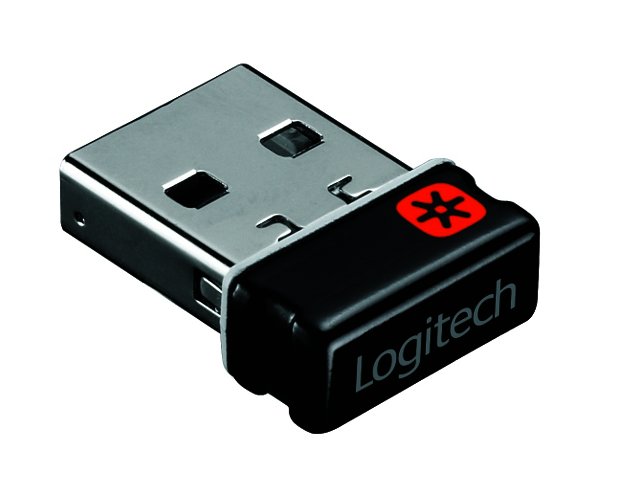
We were very impressed with the miniscule Logitech Unifying receiver, it immediately recognised both devices when its plugged into a USB port, both on a desktop and notebook. The device also has an impressive range, we were able to control a notebook from halfway across the office, although seeing anything at that range is a different story. A lengthy cable with a USB port for the receiver is also included which can be used when your PC is standing out of sight of the receiver, on the floor for example.
Batteries
Logitech claims the batteries in the two devices, which are high quality Duracell batteries, will last for up to three years. We don’t know if they’ll last quite that long, but the battery meter didn’t drop below full bars while we tested the devices.
Conclusion
At the end of the day the Logitech MK710 wireless keyboard and mouse combo is a high quality package with lots of productivity enhancing features which shouldn’t leave anyone disappointed. It’s easy to install, easy to use and very comfortable, perfect for those spending long hours in front of the computer.
The Logitech MK710 wireless desktop combo has a recommended retail price of R1200 and is available from Incredible Connection, Makro and Dion Wired.


 Logitech Pebble 2 Combo
 Samsung Galaxy S4 Zoom - white
 Quick Review: Tecno Spark10 5G
 Samsung Galaxy S4 Zoom (black)


