
 Logitech M305

 Genius SlimStar 820 Solargizer
 Cyber Snipa Warboard
Used by millions around the world, Skype, the free instant messaging and internet calling service sets out to add some nifty gadgets to enrich your Skyping experience.
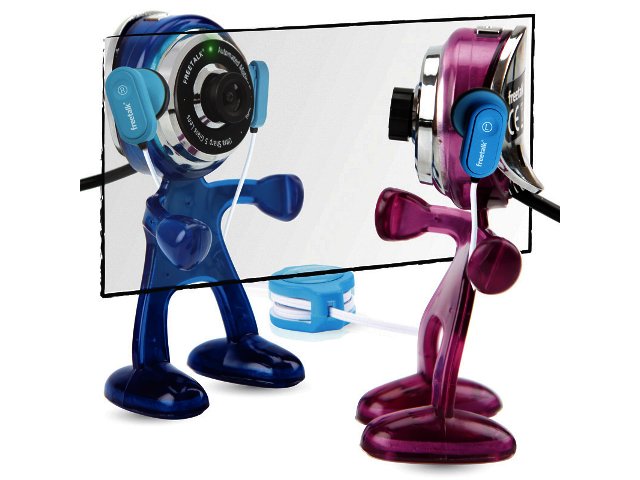
Introducing the Skype Freetalk Buddy Cam, a webcam attached to a bendable plastic body, complete with arms and legs.
With its flexible limbs the Buddy Cam can be made to stand on your desk or cling to your screen or almost anywhere else you’d like it; a true Tarzan of the webcam world.
Using the Freetalk Buddy Cam is very easy, simply plug it into a compatible USB 2.0 port and it will automatically install and configure itself with your Skype account.
Specifications
The Freetalk Buddy Cam features a 1.3 mega pixel camera capable of taking still images at 640x480 pixels and video at up to 1600x1200 pixels.
Automated motion technology with advanced colour compensation constantly updates light settings to make sure you stay in focus and a 5-element glass lens provides a crystal clear display.
Its uses aren’t restricted to Skype alone. Able to record videos at up to 30 fps (frames per second), the Buddy Cam is also suitable for recording YouTube videos or interacting with others on online video chat sites.
The Freetalk Buddy Cam is compatible with PC and Mac and has a 1.5 m long cable which is perfect for positioning your buddy where you see fit.
Conclusion
Although some may see it as somewhat of a gimmick, we found the Buddy Cam to be a useful companion for those who don’t own computers with built-in webcams.
It’s extremely user friendly and will prove to be a great companion, connecting you with friends and family all around the globe.
The Freetalk Buddy Cam is available for purchase online from the Skype shop. And unlike most online retailers, Skype has a South African portal where you can buy the peripherals without dealing with exchange rates.


 Gran Turismo 5
 Nvidia provides glimpse into mobile CPU and GPU future
 A third of all viruses created in 2010
 BT and Dolby deliver an “in-person” conferencing experience with stunning qu...


