
 Toshiba AT100-100

 Motorola Xoom MZ601
 Huawei IDEOS S7 Slim
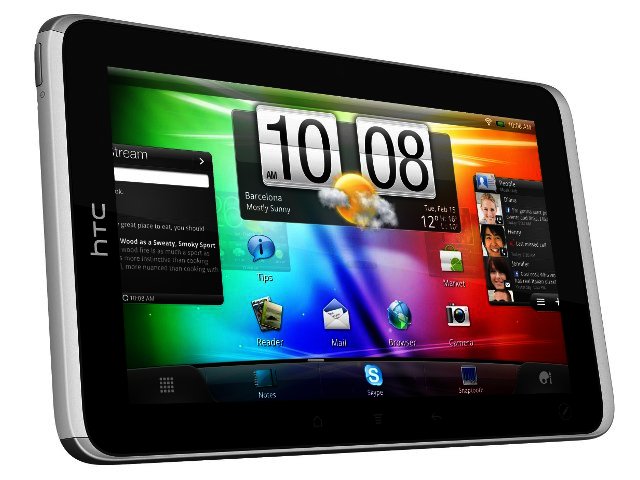
Just like the Samsung Galaxy Tab, the HTC Flyer provides a very manageable 7" of screen size in a jacket pocket friendly 420 g body. These 7" tablet models are generally a bit more manageable, with a screen size big enough for a good browsing and book reading experience.
As far as screen quality is concerned, the Flyer’s 600 x 1024 pixels is on par with that on the Tab, providing more than sufficient browsing, at least at this part of the tablet arms race.
The Flyer has of course the distinguishing feature of being able to take notes via a stylus, but more about that later, let's look at some of its specifications first.

Body and design
Design quality is overall pretty impressive thanks to an aluminium unibody design, but unfortunately the white lid underneath, housing the SIM card and microUSB slots, slightly spoils this. It’s a hassle to open and the plastic feel takes away from the overall build quality of the device. There’s a similar white cover located at the bottom of the device, but with a slightly raised bump, helping when holding the device in landscape mode.
Some might say that the Flyer could have been slightly thinner, but at 13.2 mm it’s a bit like complaining that Charlize Theron should look more like Kate Moss.
On the inside
HTC opted to go with a hardcore 1.5 GHz Snapdragon processor and 1 GB of RAM that manages to slice through images, videos, orientation switches and multitasking. What you won’t find though is Android 3.0 (Honeycomb) which was specifically designed to work on tablets. Instead it runs Android 2.3.3, heavily customised by HTC’s Sense 2.1 for Tablets interface. We liked it, with the 3D transitions for all the different screens looking good while you also have quick access to not only your notifications but also your different settings.
We also enjoyed HTC’s new method of organising apps, with your multitude of apps now easily categorised via “All”, “Frequent” and “Downloaded”. In general though it’s still reminiscent of HTC’s smartphone interface, with Friend Stream for social media update, the regular animated weather widget and HTC Locations present – a good choice if you’re already familiar with what HTC has to offer.
For your storage needs HTC included a lovely 32 GB of memory, with a microUSB slot available for any other storage requirements. It’s important to note that the Flyer has both Wi-Fi and 3G available, but unlike the Samsung Tab you can’t make calls on the device, only send SMSs.
It is possible to record HD-ready video (720p) and capture five megapixel images via the rear-facing camera, while a 1.3 megapixel front-facing camera helps with video calling. Overall video and image quality are so-so and unlike the Asus Transformer there is no mini HDMI port to connect this device to an HD telly.

Taking notes with Scribe
It does feel as if note-taking should be part and parcel of the tablet experience, and HTC has now done that with their Scribe technology. Included in the package is a stylus with which you can take notes or annotate websites you come across.
It’s an easy process to get used to with a little icon at the bottom of the Flyer, to be touched with the tip of the pen to activate your different options (touching the screen with the pen before doing this takes a screenshot). You first have to pick whether you want to take a note or if just want to write on the screen that you’re currently viewing. After that you have lots of options regarding different pen types (marker, brush, highlighter etc.), pen sizes and colours to choose from.
HTC integrates Evernote into the process, a very clever app available from Android Market that saves your notes in the cloud, making it accessible from other sources such as your PC or smartphone.
While we can definitely see the benefits of Scribe, with it also allowing you to integrate both voice recording and photo capturing into your notes, there are a few enhancements we feel should be included on the Flyer’s successor.
The stylus for example does not integrate with the tablet’s touch experience outside Scribe, which means that if you want to save your note you still have to press “save” with your finger, not being able to do this with the stylus. We found ourselves more than a couple of times trying to press buttons via the stylus, most probably because we lived through them olden days when a stylus was still meant as the primary operating input for a tablet thanks to resistive touch-screen technology.
There is also no place to store the stylus onboard the Flyer itself meaning you’ll eventually end up misplacing it. Luckily HTC includes a smart carry-case for the Flyer with a stylus holder on the side, but the problem being that you still need to take out the Flyer to work on it. It’s still a nice deal since most manufacturers do not include a carry pouch and sell it as an optional extra.

Conclusion
HTC’s first entry into the tablet market provides a very decent Android tablet experience due to a zippy processor, 32 GB of onboard storage and with both 3G and Wi-Fi present. One of the distinguishing features though is the Scribe note-taking technology which provides you with a stylus to take notes on the device, sync it with Evernote and integrate both audio and visual into the process. And while it might not contain Honeycomb, it still provide a very good Android tablet experience.
The HTC Flyer retails for R6360.
Pros
Obviously its note-taking capabilities, good looking tablet, speedy processor, included carry bag.
Cons
Stylus functionality could have been better integrated, white plastic takes away from the looks, no onboard storage for stylus.

PROS
Obviously its note-taking capabilities, good looking tablet, speedy processor, included carry bag.

CONS
Stylus functionality could have been better integrated, white plastic takes away from the looks, no onboard storage for stylus.
 Samsung Galaxy S4 Zoom - white
 Changan Hunter Diesel – Tech Meets Toughness
 Logitech Pebble 2 Combo
 Quick Review: Tecno Spark10 5G


