
 Canon PIXMA MX870

 HP Officejet 7500A Wide Format
 HP Photosmart Plus B209a 3-in-1 Printer
Although more of an evolution as opposed to a revolution in terms of its style, the Lexmark Prevail Pro705’s clean lines makes it look rather purposeful and professional. It\'s not all about looks though as the printer quality, Wi-Fi, impressive scanning facility and its eco-minded approach make it a capable SME or home performer.
Printing and scanning performance
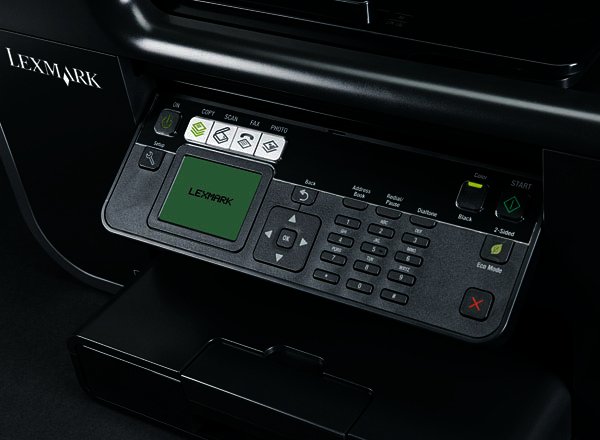
Take for example the Pro705\'s control panel. It includes a 2.4" colour LCD display, as well as a large navigation button square, a full number pad for fax numbers but also a button for Eco Mode. Press it once and it switches all output from the machine to duplex (double-sided printing) to save paper. Press it twice and it introduces a lighter, ink-saving print mode, saving you some money in terms of buying expensive ink cartridges. It\'s a novel approach to going green and to actually make use of its eco-functionality.
Maximum printing speed for black pages is 33 ppm according to Lexmark, which seems a tad ambitious to us and so does the stated 30 ppm maximum colour printing speed. The Pro705 printed at a fast enough rate, but definitely not as speedy as the claimed figures. The quality of printing was good, even on the fastest printing speed. Photo printing was as expected adequete and you\'ll be satisfied with your photo prints.
The flatbed scanner has a 4800 x 1200 ppi scanner head, which is an above average resolution and the Lexmark comes with Abbyy Sprint OCR as well as Lexmark\'s Printer Home software, which is easy enough to install and make use of.
Connectivity
There’s a whole host of card slots and USB sockets, and the printer can handle printing from SD, MemoryStick and xD cards and USB drives and PictBridge cameras. At the back are sockets for USB and Ethernet and for phone line and telephone. The Pro705 is also compatible with any IEEE 802.11 b/g/n routers that are Wi-Fi certified- a big bonus if you want to go wireless.
Verdict
The chic business all-in-one is easy to use and does a good job of both scanning and printing, making it a good choice at R2299 (remember the Wi-Fi) for any SME or professional home user who is also looking for fax capabilities.


 Know Your Anime: Uninhabited Planet Survive
 Sony announces plan to build robot that can form emotional bonds
 All versions of new Oddworld free to PS Plus subscribers
 A month with the Motorola Edge 70
 Logitech Pebble 2 Combo
 Samsung Galaxy S4 Zoom - white
 Quick Review: Tecno Spark10 5G
.jpeg) Beware of deepfakes in the AI age, warns Kaspersky
Beware of deepfakes in the AI age, warns Kaspersky


