
 Toshiba AT100-100

 Asus Eee Pad Slider SL101
 Motorola Xoom MZ601
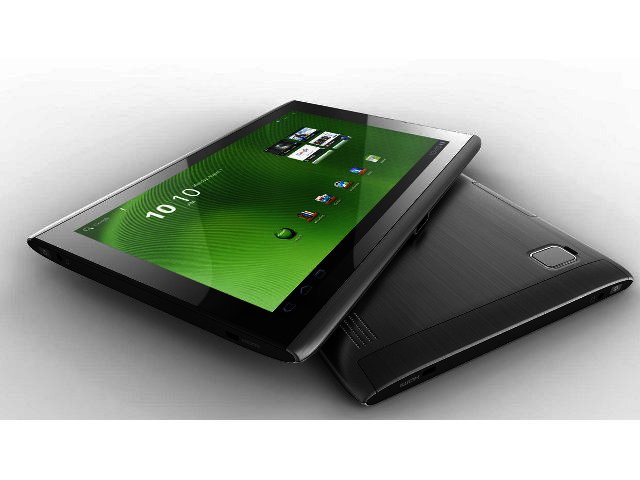
Acer joins the 10” tablet crowd with its A500 that’s powered by a Tegra 2 chipset while running on Android Honeycomb. In theory it should be a good device, but does reality care to differ?
Looks-wise the Acer cannot be faulted thanks to a very solid and attractive brushed aluminium body that frames the screen on the top and bottom. The bezel is quite thick but such is the tablet market at this stage of the race. Although brushing off 11 mm on the length, size wise it’s very close to Asus’ EEE Pad Transformer, measuring 260 x 177 x 13.3 mm against the Asus’ 271 x 171 x 13 mm. Both of them lose out against the iPad 2’s 8.8 mm frame, while the Acer’s full-bodied 765 g is also a lot heavier than the iPad 2’s 607 g.
This Wi-Fi only device offers 10.1” of screen size with a resolution of 800 x 1280 pixels. It’s slightly lower than regular notebook displays but the same as the Transformer which utilises LED technology and not LCD like the Iconia. Hopefully manufactures can come up with a smudge proof screen solution soon, since fingerprints tend to accumulate everywhere.

Tegra 2 inside
As far as processing power is concerned the Acer is equipped with Nvidia’s award winning Tegra 2 chipset that includes a dual-core ARM Cortex A9 processor running at 1 GHz. It’s the weapon of choice for a number of new tablets, including the Motorola Xoom, LG Optimus Pad and Asus Transformer. The Acer also has a solid 1 GB of SSD2 RAM, which secures decent performance.
The A500 received a solid 3682 on Smartbench 2011’s Productivity Index, while also measuring a good 2509 on the Gaming Index. Talking of which, three games comes preloaded on the Acer – Hero of Sparta (demo version), Let’s Golf and Need for Speed: SHIFT. All of them looks good, with SHIFT showcasing the powers of the Iconia the best. Access to Nvidia Tegra Zone, a portal to further games and Tegra news, is also granted.
On the productivity side things are a bit sparser, with only Docs To Go making an appearance. Docs To Go can edit documents, and when we tried to do this it told us that if we want to activate the keyboard, we would have to activate the full version. So much for editing then. It’s a shame that companies do not include full versions, since tablets are at least a bit more suitable to document creation than say a smartphone.
On the sides
On the top of the A500 you’ll find a volume rocker that would have served its purpose better if it was placed on one of the vertical sides of the device (easier to adjust when watching a movie), while a rotation lock can prevent the screen to rotate.
Also present is a very handy USB port, a nice addition to the tablet and certainly a differentiator. Plug a USB flash drive into the port and you’ll be able to copy or open files off the drive. While it can also charge devices, say for example a soon to be exhausted phone, it cannot read files from portable hard disks – a shame since it would have been nice to be able to play movies directly from these large storage devices. The USB slot makes for an easier option than having to deal with microSD cards, but the A500 would have benefitted from a file managing app pre-installed on the device. Instead we downloaded Astro File Manager to explore files.
Just like the BlackBerry PlayBook, there is a mini HDMI port with which you can link the tablet to your HD television. That is if you go to the trouble to buy the mini HDMI cable since it’s not included in the package. Still, it’s a nice addition, with other tablets such as the HTC Flyer not including such a port. Apart from providing 32 GB of data (there is also a 16 GB version available), a hotswapable microSD card slot allows for further data expansion.
Honeycomb
The Acer Iconia Tab runs on Android Honeycomb (3.0.1), a new OS built by Google specifically for the new, larger interfaces provided by tablets. Now at least your tablet does not simply feel like an oversized Android smartphone, thanks to a smart interface, easy access to your settings as well as animated notifications on the bottom right corner.

On the bottom left corner your most important icons are located, including “back”, “home” and a quick access link to screen shots of all your open applications. Touch was always a key part of Android’s design process although there’s definitely room for improvement.
For example, instead of including the icon opening up all your apps close to the main buttons on the bottom left, it’s located way on the other side on the top right. We were also much surprised by the BlackBerry PlayBook’s very easy to use OS, which definitely showed that Honeycomb might still have a thing or two to learn about user-friendliness.
Multimedia
The Acer Iconia Tab can read almost no movie files. Forget about AVI or Xvid, instead it can only cope with the less popular MPEG4 video files. Onboard sound is solid with Dolby Mobile included (even though speakers are located at the back), although headphone sound could have been slightly louder. Videos that we could play looked good, with only the slight problem that the Honeycomb bottom menu options are always visible, so no complete full screen is available. You’ll be able to watch two 90 minute movies and still have power to spare, while battery life was pretty impressive in general.
Layout for the five megapixel camera controls is very user-friendly, but we would have liked to have seen a touch-to-focus option available, and not only auto-focus. Both photo and video quality are adequate although not particularly noteworthy.
Conclusion
The Acer Iconia Tab A500 is a solidly built tablet that looks good and performs well thanks to its Tegra 2 processor. A USB port on the side makes for a nice addition, with file transfer now a lot easier – if you download a file management app.
It retails for R5999 which is less expensive than the 7" HTC Flyer, but unfortunately more than the iPad 2’s 32 GB Wi-Fi version which retails for R5399 – a bad idea since the iPad 2 dominates the market and will make it hard for the Acer to compete against it.
Pros
Solid build, speedy Tegra 2 chipset, USB port a nice addition
Cons
A bit heavy, screen flashes sometimes on when locked, not many movie files supported

PROS
Solid build, speedy Tegra 2 chipset, USB port a nice addition

CONS
A bit heavy, screen flashes sometimes on when locked, not many movie files supported
 ManageEngine rolls out autonomous AI capabilities across its suite to power digi...
 Payment security starts with design, not the audit
 Logitech Pebble 2 Combo
 Why resilient businesses treat AI as an enabler, not a strategy
 Samsung Galaxy S4 Zoom - white
 Dell Inspiron N5110


