
 Nokia Lumia 925

 LG Optimus L7 II
 Nokia Lumia 920
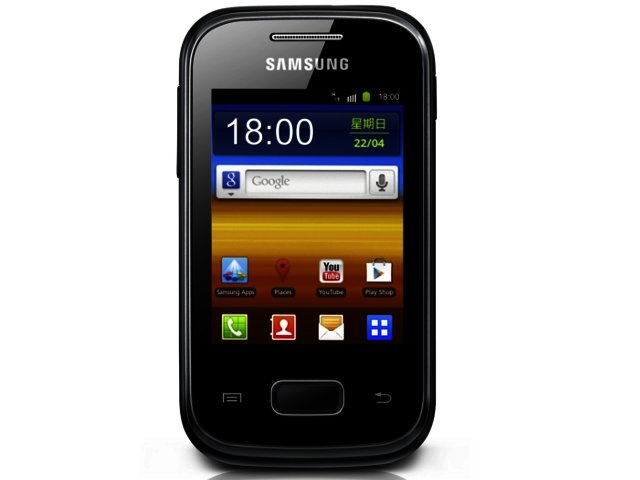
Last year we got excited about budget Android-powered smartphones that lowered the price barrier for local users looking to make the jump from mobile phone to smartphone to under R2000. Now, Korean tech giant Samsung has managed to half that price barrier to the sub-R1000 mark via its Galaxy Pocket.
Unassuming looks
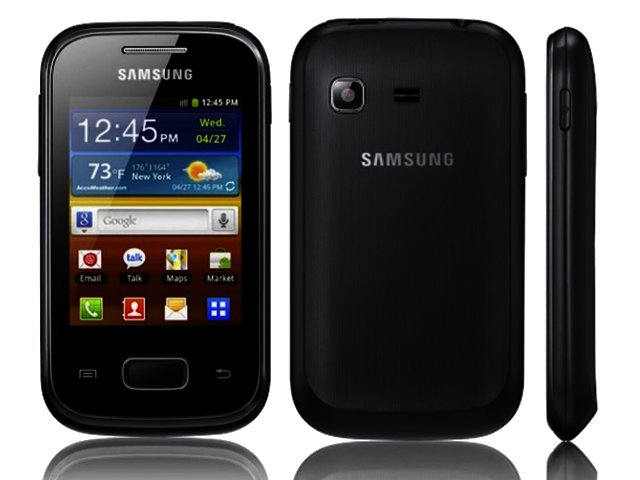
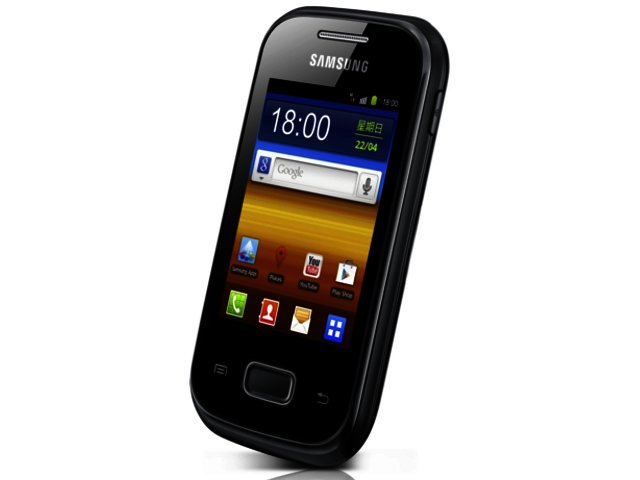
Measuring in at a barely there 103.9 x 57.9 x 11.98 mm and weighing a featherlight 97 g, it is entirely possible to pocket (pardon the pun) and forget about the pint-sized Galaxy Pocket. As with all its Galaxy stablemates, it features all plastic construction with a two tone (black and silver in this case) look.
The Pocket is most definitely not the most eye-catching device within Samsung’s popular Galaxy range, but unlike the mid- and top-end of the smartphone spectrum, design will not necessarily propel a device to the top of the desirability list for entry-level users. Here it is about having smartphone functionality at a decent price, and that is what the Pocket offers.
You access the smartphone’s features via its 2.8" (240 x 320) display, which boasts a low 143 pixels per inch count. This pixel density might be below par for a smartphone (one wants at least 180 ppi), but is at least better than that on offer (125 ppi) via the display of another entry offer - the LG Optimus L3 E400 (R1500). In practice this means that graphic intensive apps, such as Instagram, will simply not look as good, while we also found that zooming into webpages helps a lot to display it better.
The tiny virtual keys on the portrait keyboard may slow the typing pace of users with large digits, but we were surprised to discover that it did not adversely affect our typing accuracy rate much. The landscape keyboard is slightly more roomier, allowing for an enhanced message composing experience.
Poking under the Pocket’s bonnet
Samsung’s Pocket is powered by 832 MHz ARM 11 CPU, which does a decent job of keeping things relatively lag-free within its Android 2.3.6 (Gingerbread) operating system (OS) with Samsung’s TouchWiz skin piggybacking on top of it.
Having Android run the mobile OS show gives new users access to lots of features that they might not have encountered on feature phones before. These include multiple homescreens (up to seven), widgets, Wi-Fi hotspot functionality (the ability to connect your PC to your phone to access the internet), multitasking and, more importantly, access to the Google Play Store and its ever-expanding sea of apps.
Besides keeping things ticking along within the OS, the ARM 11 processor delivered a productivity index score of 299 and gaming index score of 1596 within Smartbench 2012. This is lower on both counts (540 and 2004 respectively) that the more expensive LG Optimus L3 E400 managed, courtesy of its zippy 800 MHz single-core Qualcomm MSM7225A system-on-a-chip. It does beat the scores though that the HTC ChaCha and HTC Wildfire S gave on Smartbench 2011. In comparison to these entry-level units, the quad-core HTC One X scored an impressive 4792 and 2713 respectively.
Within AnTuTu v2.9, the Pocket managed to get a total score of 1863, whereas the LG L3 scored a comfortable 628 points higher (2491). During everyday usage though the Pocket’s CPU keeps things smooth with instances of lag coming in few and far in between, such as right after running resource intensive applications like Smartbench 2012.
Musiq in your Pocket
Beyond its single-core 832 MHz CPU, the Pocket offers users access to the exclusive Pocket Musiq service via the web browser (www.pocketmusiq.mobi). By going to the Pocket Musiq site on their browser, users are able to download thousands of free music tracks including many local artists such as Die Heuwels Fantasties, Karen Zoid and Locnville.
This mobile site is well laid out and consequently quick and easy to navigate, with users able to view the latest tracks, featured artists, top downloads within each category (from Afrikaans to urban) or simply search for tracks by their favourite artist or bands. Just remember that it chomps your data, so rather find a Wi-Fi hotspot.
Other features
Also making an appearance on the Pocket’s budget feature list is a nothing-to-write-home-about 2 MP camera. It is worth noting though that it is possible to capture panorama shots via this snapper, which is also capable of recording smooth but otherwise unimpressive QVGA (320 x 240) videos at 15 fps.
Users get a 1200 mAh battery that enables the Galaxy Pocket to put in a full working day, but extended Wi-Fi sessions will quickly whittle that down. In addition, you also get Bluetooth v3.0 with A2DP, Stereo FM radio with RDS, HSDPA connectivity with download speeds up to 3.6 Mbps, GPS with aGPS support and Wi-Fi 802.11n. The Pocket further offers users a handy 3 GB worth of internal storage, which can be expanded upon via the microSD memory card slot that supports cards up to 32 GB in size.
To the point
Samsung’s Galaxy Pocket crams all the functionality budget- and first time smartphone users may want for less than R1000 (if you look in the right place). With its recommended retail price of just R999, it is significantly cheaper than LG’s Optimus L3 E400 as well as one of our favourite budget devices of last year, the Samsung Galaxy Gio (R2000).
The display resolutions may not be stellar, nor is the 2 MP camera, but for about a grand, you get a portable Android Gingerbread running smartphone, with an 832 MHz CPU and access to a large variety of free music by way of the Pocket Musiq portal.
Pros:
Priced below R1000; really portable dimensions; 800+ MHz CPU on budget device; Android Gingerbread as mobile OS, and 3 GB worth of storage space.
Cons:
Low-res touchscreen; other mobile phone users won’t turn green with smartphone design envy; camera is not the best and QVGA video recording ability.


 Top 5 phablets of 2016
 AVG report warns about cyber crime catastrophe
 Lexmark invites third-party developers to build printer apps
 New study shows data strategies are rapidly evolving
 Logitech Pebble 2 Combo
 Samsung Galaxy S4 Zoom - white
-2.jpg) The AI notetaker has become a corporate liability
The AI notetaker has become a corporate liability Acer launches Googlebook 14 in new flagship category featuring built-in Gemini A...


